
REDCap
The Research Computing Centre at The University of Queensland manages a REDCap instance for UQ research.
About UQ REDCap
REDCap is a secure web platform for building and managing online data collection. REDCap's streamlined process for rapidly creating and designing online forms offers a vast array of tools that can be tailored to virtually any data collection strategy.
REDCap features include: exports to specific statistical packages (SPSS, SAS, Stata, R); randomisation; audit trail logs; longitudinal repeated measures; calendars and scheduling; form branching logic; data quality rules; data workflow resolution; file uploading; calculated fields; logic triggered alerts; data segregation (example: multi-site studies can ensure your site’s data can only be seen by your site); summary statistics dashboards; participant completed survey(s) sent to a schedule; SMS integration; ad hoc reporting tools.
If your requirements are for a simple single online survey then alternatives at UQ include: Qualtrics, CheckBox, and Microsoft Forms. Please ensure that your chosen platform is appropriate with respect to privacy and security for the type of data that you are collecting.
For more information about REDCap please contact: redcap@uq.edu.au
REDCap Migration Information
The REDCap service has been migrated to a new UQ cloud-hosted environment. This upgrade is designed to ensure the integrity and consistency of data as it is relocated to the new infrastructure.
Changes to Service Appearance:
The appearance of the service will be updated.
There will be minor changes to the service’s appearance. Please note these updates as you navigate the new environment.
Login Instructions for Existing Users
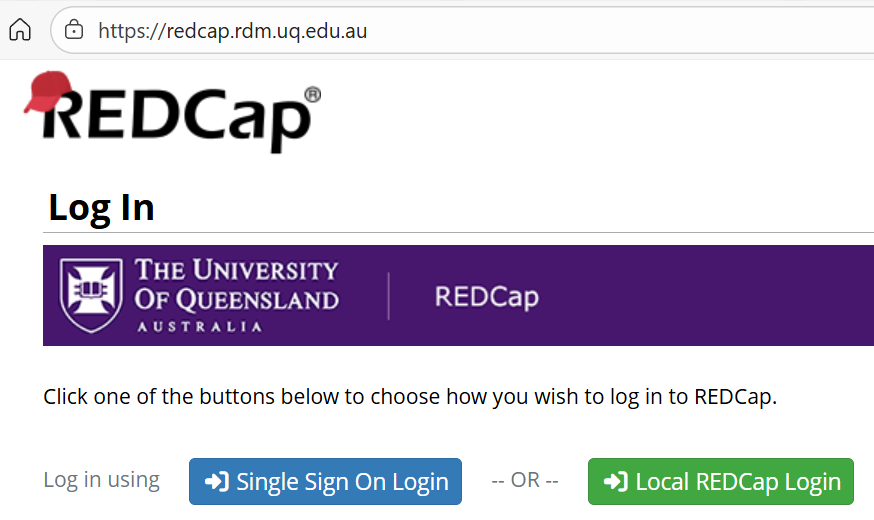
Existing users should log in using the green “Local REDCap Login” option and their current username and password. The “Single Sign On Login" method will not be available immediately and requires a support request via redcap@uq.edu.au
Upcoming Changes to Account Access
In the coming weeks users will be prompted to sign in using their UQ accounts via the Single Sign On Login option and ensure their new account is added to all relevant projects. Collaborators and sponsors will be provided with further guidance as their access transitions to this new authentication process. Additional instructions will be communicated during the final transition period.
Removal of Project Creator Rights
To maintain compliance with product licensing and governance for the REDCap service users will no longer be able to self-create new projects. Any new project creation will require a request to the REDCap support team. This change will not affect existing projects.
Techniques and Services
Availability
The UQ REDCap server is available at no charge to all UQ studies led by UQ researchers. There is no annual fee for REDCap usage (see FAQs). Note access to your UQ study can also be extended to any number of external collaborators, such as remote site clinic staff.
REDCap administration
While your study staff will typically handle the operation of your project, there are REDCap functions that can only be serviced by the REDCap administrator. The standard REDCap administration includes:
- Create/edit/unsuspend any user accounts required for your project. Example: accounts for: site staff, data entry, project manager, investigators, etc.
- Pass on your production status project changes
- Enable any optional modules (e.g. double entry, SMS)
- Process project framework changes to production status projects.
- Basic help, trouble shooting, tips and tricks
Help and support
A REDCap Support CRM queue has been established, and the address redcap@uq.edu.au is now in place to triage all REDCap support requests going forward.
If you have questions about the migration, please contact UQ RedCap Service at redcap@uq.edu.au
Individualised workshop
We can provide a customised session(s) to work through the setup of the structure of your own project, including development of some of your forms to ensure the framework is configured to your study's requirements, with the aim to familiarise your team with the REDCap processes and take over the build.
Project development
While we strongly recommend that staff develop their own project within REDCap, we can provide a quote for complete development of your project framework and forms. Please contact the REDCap administrator for more information.
FAQs
Should I backup my data?
Yes, and regularly. See Backup your REDCap project.
I need to add a new project staff member to my REDCap project, what do I do?
New user requests need to come from project management or investigator who has "User Rights" permissions within the project. Send an email to the REDCap administrator redcap@uq.edu.au with the following information:
prefix firstName familyName emailAddress
Example:
My user name is proj_username.
Please create accounts for the following new users:
Project username prefix: mlria_
Han Tran : han.tran@its.uq.edu.au
John Example: john.example@uq.edu.au
Jane Another: jane.another@uq.edu.au
Note: Please use email addresses for named individuals, and never use general email addresses, e.g., manager@dept.uq.edu.au.
Once a new account is created, the project manager or investigator will be added as a sponsor to new users. Sponsors are able to:
- Reset user passwords
- Suspend/reactivate users
- Extend expiry dates
- View the projects that their users are connected to
The sponsor will then be able to add the new user account to projects as required.
Can I store large amounts of data within REDCap?
For most studies, the record size per participant is small (even for lengthy multiple section surveys), however some researchers have expressed the desire to store large files such as scanned x-rays, audio interviews, video and the like. We have recently migrated to a new server and currently have a reasonable amount of space available to accommodate moderately modest scale data storage within the REDCap server. However, if your project requires massive data storage (example: an hour video per participant) then we request that you contact us to discuss storage options (UQ RDM). Please contact the REDCap administrator for more information, with an estimate of the size of files per participant and the number of participants.
How much does the service cost?
UQ provides the REDCap service at no cost to its researchers for general projects and basic utilisation. By way of consultation, specialised work and study design can be requested on a for-fee basis via the Data Science CRP
My study needs multiple REDCap projects, is the charge per project?
Many studies require multiple logical REDCap projects to run (e.g. one REDCap project for participants, another for their children, i.e. one parent to many children) however as long as the REDCap projects are the single study then there is only one charge.
For multiple REDCap projects to be flagged as a single study, the main project must be identified as “Research” and the other studies should be “Operational Support” under: Project Setup > Main project settings > Modify project title, purpose, etc > Project’s purpose
Operational Support status is to be used only for REDCap projects that are directly involved in the operation of the one main “Research” study. Typically OpSup type projects are for handling different unit records in the same study that don’t fit well together in the one project, examples: (1) A study that has exclusion criteria, and randomisation into arms, this needs a separate project for enrolment and randomisation, and another project where only included participants are placed into the appropriate arm; (2) A study that records a range of household details and also multiple forms for person details within each house, this study could create a project for household data and another for the human data; (3) A multi-clinic study records information about the clinic, the doctor and patients could have three projects clinic, doctor, patient.
Does my sub-study qualify as the same study?
"Sub-studies" and "side studies" usually do not qualify to be operational support. There is a reasonably generalised definition for a same-study consideration: described in the same protocol as the main study, described in the same ethics document, works on the same (or a subset of) the main study participant group, and has the same end date as the main study.
Can I use SMS with REDCap?
Yes, but there is an additional expense incurred by your project directly with the third part SMS service (Twilio). Please contact the REDCap administrator for more information.
What SMS features are offered within REDCap?
- Send an SMS with a link to a survey to study participants.
- Send questions and receive answers via SMS.
- Conduct a survey via computerised voice.
- Send alerts to project staff based on your rules defined within REDCap.
What are the iOS / Android REDCap app?
We do not support the iOS or Android REDCap apps but you are welcome to use these under your own support.You need to be aware of the caveats, particularly: not all REDCap features work, data storage and transfer issues. The mobile apps are only for project staff use, not participants. The apps are designed to allow data collection when there is no internet connectivity. If you are confident of internet availability then we strongly recommend that you make use of your portable device's web browser which will operate with the standard REDCap web interface.
What is MyCap?
MyCap is a separate mobile application that is designed specifically for participants to use directly. Studies can also use this under their own support with the same caveats as the iOS and Android REDCap apps.
My project isn't working as expected, where do I go?
Contact the REDCap administrator, ensure you include your project ID (PID), your exact project title, a screen shot of any error reported and/or relevant screen, a description of where within REDCap you were to cause this issue.
May I have an External Module enabled for my project?
Please note that for security and performance issues, we do not install external modules or plug-ins or hooks, and we restrict direct access to data via the REDCap API (external software). REDCap provides multiple methods to download data in a variety of formats and we strongly encourage projects to take advantage of this facility.
May I have direct API access to my REDCap project?
We provide API access on a case-by-case basis. If you require an API token, please contact the REDCap administrator with the PID a brief summary of how the API will be used.
Backup your REDCap Project
For information about how to backup your REDCap project — including regular backups; backups after project structure changes; and backing up after a project is completed — please visit the separate UQ webpage titled "Backup your REDCap project."
For more information about REDCap please contact: redcap@uq.edu.au